Product

Meeting notes

The meeting ends.
The next steps are clear.

Stay focused on the conversation. Your meeting notes are ready to review when the meeting ends. The audio never leaves your computer.

During the meeting: stay in the conversation

The sound, your notes and your talking points are in one place.

Live

Discreet modeDuring a screen share, the client, the topic and your notes disappear from the screen.

Call with the developers

Client 1 · Alex, Camille, Noa

MicrophoneYour voice and the room’s
Computer soundThe voices of the video call

Prototype approved. Check the expired link case.

To cover

  • ✓Approve the login flow
  • Confirm the prototype timeline
1 point covered out of 2

Your talking points stay in view. You tick them off as the conversation goes.Illustrative example · fictional data

After the meeting: notes ready to review

The notes arrive on their own. You review them, correct them and share them.

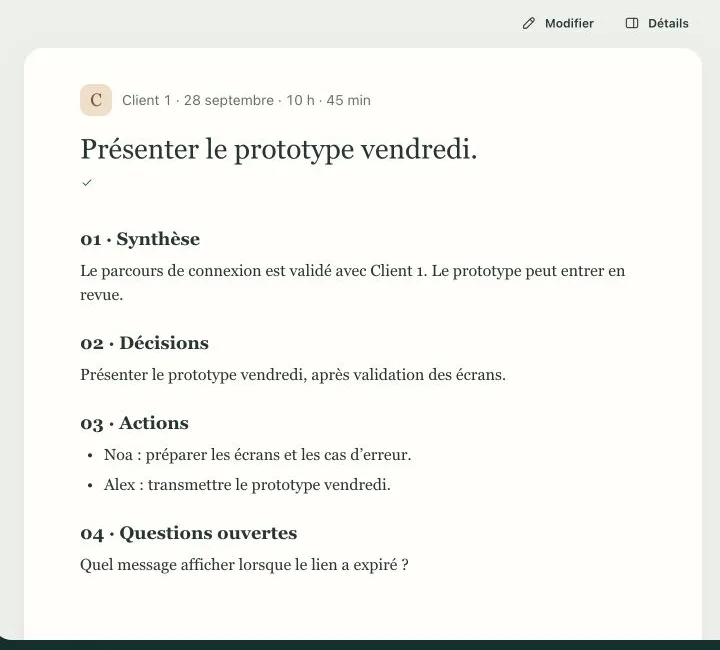
Notes from a project meeting: summary, decisions, actions and open questions (fictional data)Enlarge

Clear meeting notes

Summary, decisions, actions and open questions. The notes stay “to review” until you approve them.

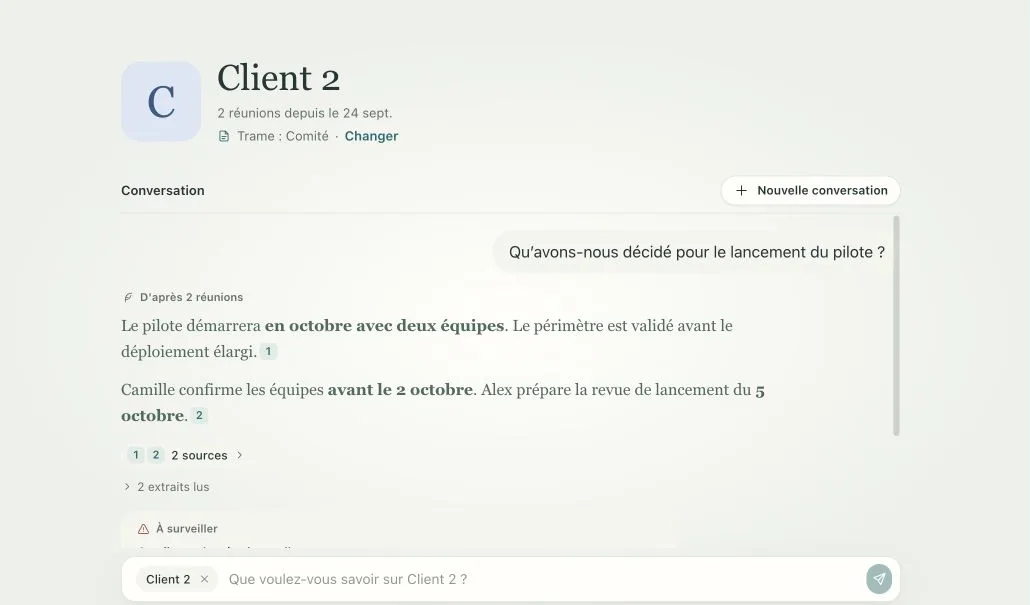
Question asked about a client’s file, with the answer and its sources (fictional data)Enlarge

Answers about your meetings

Ask a question about a client’s meetings. The answer cites its sources.

Your past recordings

Import an audio or video file. You get its meeting notes too.

Your calendar

Your upcoming meetings appear on their own, from Microsoft 365.

The next meeting

Arrive prepared: the client’s history is already there.

Sharing

Copy or export the notes whenever you want. Nothing leaves without you.

Application screenshots · fictional data

In your format

The notes take the format your team already uses. Three templates are ready: client, internal, committee. You can also create your own.

The client context, up to the next deadline.

Decisions and next steps, ready to share.

Example · fictional data

Client 1 · Project meeting

28 September · Camille, Alex, Noa and Sam

Summary

The project scope is approved. The team is preparing the launch, subject to legal approval.

Key points

The timeline, responsibilities and go-live conditions are clarified.

Decision

Target 15 October for go-live.

Actions

To doWhoWhen
Approve the legal frameworkAlex8 Oct.
Prepare the demoNoa10 Oct.
Share the timelineSam30 Sept.

Key quote

“We keep 15 October as the target, with legal sign-off first.”

Open question

Who gives final approval for the release?

Next deadline

Approval meeting on 8 October.

Client template

Your data stays under control

The audio never leaves your computer. To write the notes, the transcript goes to the AI you choose.

Audio recordingTranscript

The audio stays here. The transcript is computed here.

The AI you choose

It receives the transcript and your notes. It writes the meeting notes.

First choice

On your computer

An AI installed on your computer. Everything stays with you.

On your company’s servers

Your company’s AI server, on your infrastructure.

Your AI subscription

The AI service your company already uses.

A confidential client? Their notes are written on your computer.

Frequently asked questions

Which AIs can write the meeting notes?

An AI installed on your computer. Your company’s AI server. Your Claude or ChatGPT subscription. Or direct access through Anthropic, OpenAI, Azure OpenAI, Mistral or OpenRouter. No AI is selected at installation: nothing leaves until you have chosen one.

Does the recording leave my computer?

No. The audio stays on your computer. The transcript is computed there. To write the notes, it goes to the AI you have chosen. For a confidential client, nothing leaves.

Does it work with our video conferencing tools?

Yes. The application records your microphone and your computer’s sound. So it captures the voices of the video call, whatever the tool.

Can we import an existing recording?

Yes. Import an audio or video file, for example in MP3 or MP4. You get the transcript and the meeting notes.

Can we adapt the notes to our habits?

Yes. Three templates are ready: Client, Internal, Committee. You can create your own. Every set of notes can be corrected before it is shared.

Ready to take action?

Tell us which tasks take up your time. We tell you what an agent can do.

Request a demo30 minutes, no commitment